
How To Fix CLS (Cumulative Layout Shift)

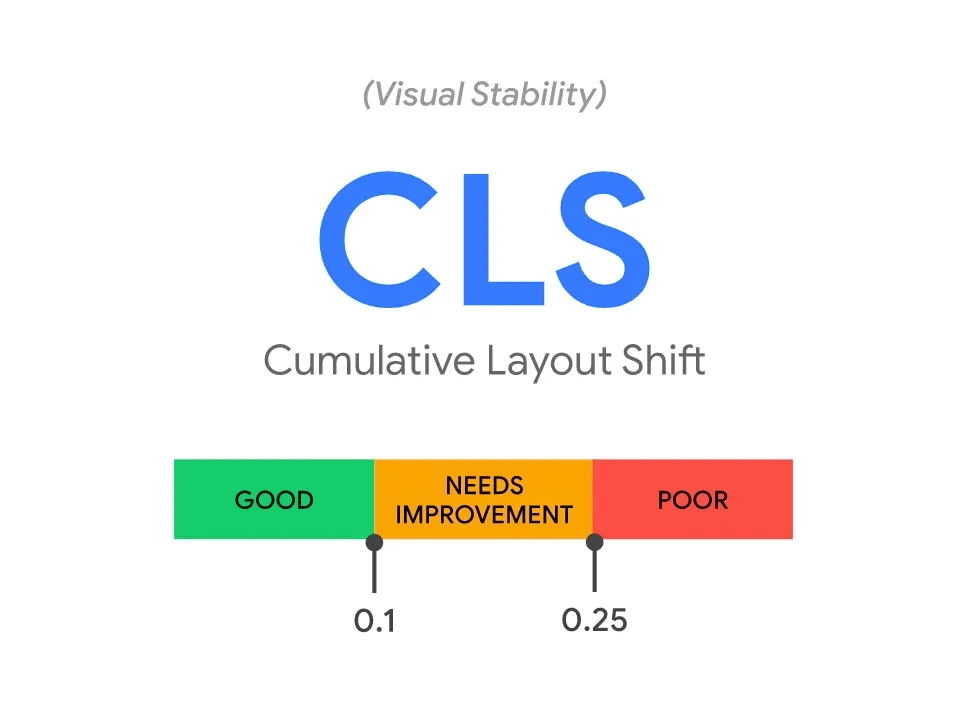


Google’s Cumulative Layout Shift (CLS) score aims to measure the visual stability of a web page. It helps to determine how often users experience unexpected layout shifts. Website owners should aim for a low CLS score.
CLS is part of Google’s Core Web Vitals initiative and will start influencing Google’s SERP rankings in June 2021 when Page Experience Signals are incorporated into Google’s search algorithm. As a result, it’s critical for publishers and SEO specialists to understand how to achieve an excellent CLS score.
What is cumulative layout shift (CLS)?
Cumulative Layout Shift or CLS refers to website content that shifts during the lifespan of a page. Most CLS tends to occur during the initial page load but it can also be triggered any time an element visible within the viewport moves from its initial position.
If the page content shifts a significant amount it makes it difficult for users to read and navigate. In addition, it can lead to users clicking on the wrong link as the example below shows.

Source: Google
What causes cumulative layout shift (CLS)?
Cumulative layout shift is usually caused by resources that load asynchronously or DOM elements that get added dynamically above existing content.
The top 7 causes of CLS are:
- Advertising units (ad units) that use dynamic sizing
- Dimensionless images and video (missing height and width specifications to maintain a responsive aspect ratio)
- iFrames with no dimensions
- Widgets that dynamically resize
- Fonts that render larger or smaller than their fallback, also known as Flash Of Unstyled Text (FOUT) or Flash of Invisible Text (FOIT)
- Actions waiting for a response from the network before updating DOM
- Content inserted after the initial page load
CLS can be difficult to detect in a development environment. Therefore, when checking your site make sure your browser cache has been cleared, and API calls are not running locally.
How do you measure cumulative layout shift (CLS)?
The CLS score from Google measures the amount of layout shifts that occurs during the lifespan of the page. A CLS score ranges from 0 (the best) to 1 (the worst). A layout shift occurs any time the position of a visible element changes from one frame to the next.
Google says:
“To provide a good user experience, pages should maintain a CLS of less than 0.1.”
Source: Google
Here’s Google’s in-depth guide on how CLS is measured using the Layout Usability API.
What’s my cumulative layout shift (CLS) score?
You can see your website’s CLS score by visiting PageSpeed Insights or checking Google Search Console.
Using Google’s PageSpeed Insights
If you submit a URL to Google’s PageSpeed Insights tool it will provide a full assessment of the page’s Core Web Vitals including it’s CLS score.
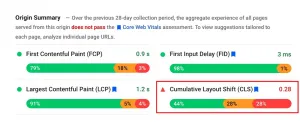
Source: Google
Using Google’s Search Console
Alternatively, you can use the Google Search Console. Go to Core Web Vitals in the left sidebar then open a report for desktop or mobile. This will provide a list of URLs with a low CLS score.

Source: Google
How to detect CLS
CLS can be detected using Google Chrome’s Developer tools or by manually visiting a web page to see which elements are causing the layout shift.
Google's CLS Treemap
In PageSpeed Insights you will find a treemap that shows when and how elements were loaded on the page. You can use this breakdown to see which elements shift the content on the page when they are loaded.

The manual approach
You can manually open a url with your browser to see which elements shift when the page loads. In addition, it’s best to scroll down and interact with the page to see if those actions trigger CLS. Since Google is calculating CLS from the perspective of the user, this should give you a good idea of what is causing the problem.
Google Chrome’s Developer Tools
Alternatively, you can open up Chrome’s Developer Tools by left-clicking on a page and selecting “Inspect”. From there, navigate to the Performance tab and click on the record button. As you browse the web, Chrome will now register any CLS and provide a breakdown of when it occurred at the end of the recording.

Source: Google
How To Fix It CLS (Cumulative Layout Shift)
To fix CLS, you need to find out which elements are causing it. Advertising units, dimensionless images, widgets and FOUT can all cause CLS. Use webvitals.dev/cls to find out where the problem is. Then use our guide below to fix the issue depending on which element is causing the CLS.
Advertising Units Causing CLS
Ads are one of the biggest causes of layout shifts. Ad tech companies and display advertising providers often use dynamic ad sizes to allow more advertisers to compete for an impression. This increases competition and results in more revenue. However, since the size of the ad is variable and the creative only loads after the page’s DOM has been created, it can also lead to content shifts.
Here’s how you can reduce CLS caused by advertising units:
- Reserve space for the ad slot. By styling the element before loading the ad tag library, you can minimize the chance that the creative will shift other elements on the page. This is particularly important for ads at the top of the page or in the content stream.
- Use a fast ad serving solution. The faster the ads load and the page becomes stable, the lower your CLS will be. Lower is better when it comes to CLS scores. Using a header bidding solution that incorporates server side header bidding like Snigel’s AdEngine will ensure lightning-fast load times.
- Snigel’s AdEngine was tested to produce the best CLS score with most websites. In the rare case that CLS is an issue, Snigel’s integration engineers can help you change the loading order of elements to improve your score.
- Don’t collapse the ad space if the ad impression is not filled. Instead, use a placeholder and set it to fit the largest possible ad size.
- Lazy loading with pre-reserved ad space placeholders
If you’d like to find out more about how to fix CLS caused by your advertising setup, contact our AdOps team here.
Images Causing CLS
Specify the height and width of videos and images on your site to ensure they load correctly. For example:
<img src=”snigel.com/images/test.jpg” width=”1440″ height=”810″ alt=”Snigel Test Image”>
With responsive images, srcset determines the images that the browser can choose between. For example:
<img srcset=”snigel-test-480w.jpg 480w, snigel-test-800w.jpg 800w” sizes=”(max-width: 600px) 480px, 800px” src=”snigel-test-800w.jpg”alt=”This is a test image from Snigel.com”>
FOUT Causing CLS
Flash of Unstyled Text (FOUT) occurs when browsers display a fallback font before the custom font loads. Flash of Invisible Text (FOIT) happens when the browser delays rendering text because it is still waiting for a font from a web server to be fully downloaded.
Google and Typekit teamed up to build the webfontloader script which provides an easy way to load fonts correctly. It is important to insert this script straight after the opening <head> tag to ensure it loads first. You can also try using rel=”preload” to tell the browser to download the font as soon as possible.
CLS in 2022
Since CLS became part of Google’s search algorithm in 2021, we expect many owners to track this key metric closely. If you’ve noticed ad units giving you a poor CLS score then contact our AdOps team here to get it fixed.
Book a call with an expert
We pride ourselves on creating meaningful relationships with our publishers, understanding their priorities and customizing our solutions to meet their unique needs.