Google MCM (Multiple Customer Management) in 2025 : Definitive Guide





Google's MCM Framework (Multiple Customer Management) is the current way for publishers to access Google Ad Exchange (AdX) through an approved partner. It replaced Google's SPM (Scaled Partner Management) program back in 2021 and has since become the industry standard. MCM is a tool for publishers to increase their ad revenue and gain deeper insight into their Ad Exchange performance.
In this guide, we’ll explain how MCM works in 2025, what types of delegation exist, and how you can partner with Publisher Collective to access AdX, Open Bidding, and Private Marketplace demand.

What is Google SPM?
Google SPM (Scaled Partner Management) was the previous program that allowed publishers to access Google Ad Exchange through a third-party ad technology company or channel partner. By using Google Ad Exchange, publishers could connect with a larger pool of advertisers, increasing competition for ad inventory and, in turn, boosting revenue.
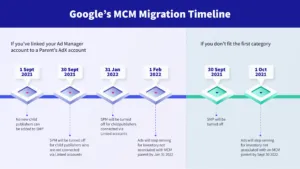
SPM was officially deprecated in July 2021 and replaced by Multiple Customer Management (MCM).
Why did Google replace SPM with MCM?
There were several issues with SPM:
- Harder to add new features
- Less functionality for managing publisher permissions
- Less transparency for publishers
- Less access to ad management features
SPM was originally developed when Ad Exchange and Google Ad Manager were separate products. As Google unified its ad platforms, maintaining and updating SPM became impractical.
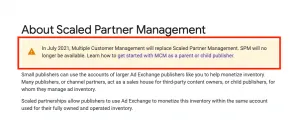
source:google
MCM provides improved transparency and functionality for publishers and advertising technology companies. In addition, it will be native to Google Ad Manager (GAM) so users can access it with ease.
What is Google MCM?
Google MCM (Multiple Customer Management) is an Ad Manager 360 tool that allows publishers to access Google Ad Exchange through select 3rd party Google partners. The publisher connects their ad inventory to the partner’s account, giving the partner permission to manage and optimize monetization on their behalf.
MCM is a feature that will only be available to Google partners that fulfill strict quality criteria. This includes the protection of represented inventory against ad fraud (including invalid traffic, click spam, and accidental and forced clicks) and a low number of account terminations. Publishers who want access to MCM can do so through a qualified Google MCM program and Google Certified Publishing Partner (GCPP) like Snigel Tech via Publisher Collective. Contact us here to get started.
There are two key roles in Google MCM: parent publisher and child publisher. “Parent publisher” refers to a 3rd party advertising technology company or Google certified partner who has direct access to Google Ad Exchange. “Child publisher” refers to an entity that gets access to Ad Exchange through the Parent Publisher.
MCM Delegation Types
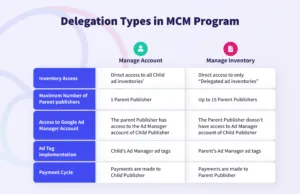
There are two MCM delegation types or modes of use: Manage Account and Manage Inventory.
MCM Manage Account Delegation
The MCM Manage Account delegation type grants parent publishers edit access to manage inventory directly in the child publisher account. The child publisher retains permissions and access to all settings.
MCM Manage Inventory Delegation
The MCM Manage Inventory delegation type grants parent publishers access to ad requests that the child publisher has sent to the parent account. This is a more limited level of access than the Manage Account Delegation.
EU User Consent Policy compliance
All MCM inventory must comply with Google’s EU User Consent Policy. The parent and child publisher must ensure that personalized ads are only served after a user provides consent. See our guide on serving ads without user consent if you would like to recover revenue when user consent is missing. See our guide here on how to choose a CMP if you are not yet gathering user consent.
Why Use Google MCM Program?
- Access to premium Google demand (via Google Ad Exchange/AdX)
- Access to demand from other premium exchanges via Google Open Bidding
- Access to Programmatic Direct deals (Preferred Deals and Programmatic Guaranteed)
- Access to 3rd party ad management and optimization
Overall, this functionality helps publishers increase their ad revenue and save time by outsourcing all or part of their ad operations. Publisher Collective received early access to MCM as part of the beta program. We’ve had some time to test out the new features and overall we’re pleased to say MCM is a strong improvement over SPM.

Premium Exchanges via Open Bidding
Open Bidding is Google’s server-side header bidding solution. It lets more advertising demand partners bid on your inventory without the added latency of client-side header bidding. Open bidding is limited to Ad Manager 360. As a result, most publishers have not been able to access this powerful feature. Publishers can now access Google Open Bidding through an MCM partner like Publisher Collective.
More Programmatic Deals
MCM makes Programmatic Guaranteed and Preferred Deals easy to manage. These high CPM tools deliver additional revenue to publishers.
Google MCM Program vs. AdSense
AdSense publishers that switch to MCM should notice a strong increase in ad revenue. You can find an estimate using Publisher Collective's AdSense revenue calculator.
How can I access Google MCM Program?
As a Google MCM program partner, Publisher Collective can invite publishers to MCM. Contact us here to start the process. We’d be happy to answer your questions and tell you more about how MCM could work for your website.
Eligibility Criteria for the Google MCM Program
To determine if you're eligible to join the Google MCM program, ensure you meet the following requirements:
- Website verification by Google
- No copyright infringement violations on your website
- Avoid promoting sensitive content such as adult material, violence, or gambling
- Maintain a valid ads.txt file for your site
For most publishers, these criteria should not pose any significant challenges. If you double-check that you fulfill the above, you should be well-prepared to qualify for the MCM program.
Who Is On The Google MCM Approved Partners List?
- publisher-collective.com
- OKO.uk
- NeworMedia.com
- MonetizeMore.com
- PubGalaxy.com
My partner can’t offer MCM
MCM partners have to meet strict new criteria for ad inventory quality. As a result, many monetization providers have not qualified. If your existing partner doesn’t have access to MCM you will need to find a new partner like Publisher Collective. If you’re unsure whether your partner qualifies for MCM contact them immediately. Any partners that were not qualified by July 2021 lost access to Google Ad Exchange.
How do I switch to MCM?
Every site added via MCM will need to be approved by Google. This can take approximately two weeks.
How to update your GPT or video tags for MCM
Once MCM is enabled, your Google Publisher Tag should be updated to add the child network code to the child network’s ad unit in order to use inventory management. Use the tag generator or manually update the JavaScript.
GPT code sample:
<head> <script async src="https://securepubads.g.doubleclick.net/tag/js/gpt.js"></script> <script> window.googletag = window.googletag || {cmd: []}; googletag.cmd.push(function() { googletag .defineSlot('/1234567,1234/Travel', [300, 250], 'div-gpt-ad-1568729559138-0'); [...] } </script> </head>source: google
The highlighted parameter, 1234, represents the network code for the child publisher. 1234567 represents the parent’s network code.
You must add the highlighted parameter to the .defineSlot() function. This will allow the child publisher network to be recognized and help creatives serve correctly when “Manage Inventory” is enabled. No changes to the line items or targeting are necessary.
Your MCM Questions
If you’d like to find out more about MCM contact us here. Our AdOps experts have in-depth knowledge of Google MCM and will be happy to respond to your questions.
Bonus: The Comprehensive Glossary of Google Multiple Customer Management
- Google Ad Manager 360 (GAM 360)
This is the premium version of Google Ad Manager, allowing users to serve a larger number of impressions when they surpass their monthly limit. Frequently chosen by enterprise-level publishers managing extensive ad operations, inventory, sales, and multiple child publishers, GAM 360 has added perks such as Google Data Studio integration, advanced audience segmentation, and a robust reporting interface. - Google AdX
Originally known as DoubleClick Exchange, Google AdX is an ad exchange platform powered by programmatic advertising. It is a marketplace supporting real-time bidding (RTM) among publishers, demand partners, and ad networks like AdSense and DSPs. To access Google AdX, publishers need to fulfil Google's entry requirements or work with a Google-certified MCM partner like Publisher Collective. - Open Bidding
Open bidding is a transparent, real-time auction where publishers invite multiple third-party demand partners to compete for their ad inventory. This process, conducted through server-to-server bidding, simplifies reporting, billing, and inventory management. - Google Multiple Customer Management (MCM)
MCM is a Google-operated advertising platform developed for publishers. It replaced the former Scaled Partner Management (SPM) program, keeping its core principles intact but addressing the issues related to SPM, such as a lack of transparency in the parent-child publisher relationship and challenges with ad inventory delegation. - Scaled Partner Management (SPM)
SPM is a former Google solution that enabled child publishers to use Google AdX for monetization through the Google SPM program. SPM was superseded by the more efficient MCM program, aimed at enhancing transparency and communication between publishers and driving further benefits. - Managed Inventory (MI)
Managed inventory is an MCM delegation type where the parent-child publisher relationship where the parent publisher manages the inventory within their own account. However, the child publisher is given the authority to access details and analytics from the parent account when necessary. - Managed Account (MA)
This MCM inventory delegation model allows the child publisher to grant the parent publisher access to and management rights over the delegated ad inventory within the child publisher's account. Control over permissions and settings remains with the child publisher. - Google MCM Partners
These are third-party ad tech companies that meet Google's criteria to become certified Google MCM partners, also known as parent publishers. They assist child publishers in accessing the Google AdX Console and monetizing their ad inventory.
Book a call with an expert
We pride ourselves on creating meaningful relationships with our publishers, understanding their priorities and customizing our solutions to meet their unique needs.